From 175 scattered assets to 76 on a CDN: consolidation, optimization, and brand versioning
We had 175 brand assets scattered across 4 repositories. A branding change required 4 deploys. We solved it with a dedicated repo, S3 + CloudFront, and a single environment variable.
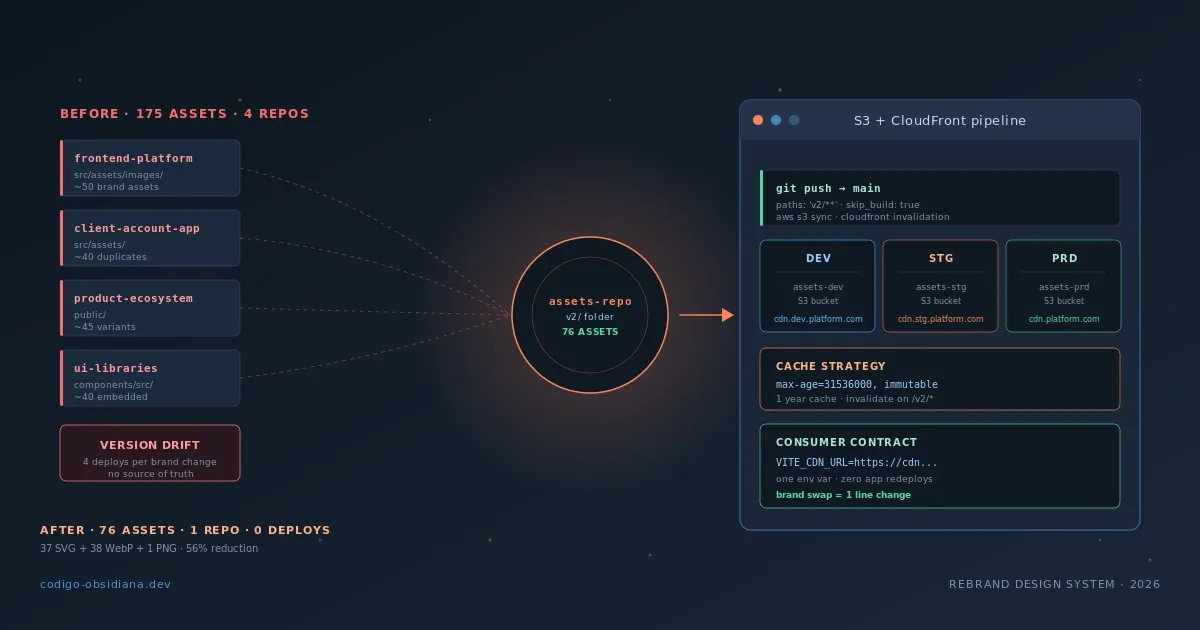
Before this work, changing the platform's logo meant opening four repositories, creating four pull requests, and coordinating four deploys. Sometimes the new logo appeared in production in one repo before the others had merged. For hours, the same platform showed the old logo on the login screen and the new one on the dashboard.
The goal was simple to state: a brand change should be a one-line change. One environment variable. Zero application deploys.
This post documents how we got there.
The problem: assets coupled to the deploy cycle
Brand assets — logos, banners, error states, onboarding illustrations — lived inside every repository that needed them. In frontend/src/assets/images/. In client-master-account/src/assets/. In ecosystem-repo/public/. In libraries-repo/packages/components/src/.
The practical result was predictable:
Version drift. Each repo had its own copy, and those copies diverged. An accessibility fix on an SVG required applying it in each repo separately. Most of the time, it only got applied in one.
Coupling to the deploy cycle. Assets were part of the bundle. If design updated a logo, that logo didn't reach production until the next app deploy. If there was a feature freeze, the logo waited.
Invisible to the design team. There was no source of truth. To know which version of an asset was in production, you had to look in four different repos.
Counting files before the migration I reached ~175 brand assets distributed across those repositories. Not all exactly duplicated — some repos had variants others didn't — which made the situation worse: the inconsistency wasn't uniform.
The decision: a dedicated repository as source of truth
The obvious solution would be "upload the assets to S3." But the most important decision wasn't the infrastructure — it was the management model.
An unstructured S3 bucket is a drawer. Anyone can upload anything, with no naming convention, no change history, no review. In six months you have logo-final-v3-REAL.svg and logo-new-2.png living together.
The decision was: the Git repository is the source of truth. S3 is a mirror of the repo. The repo's structure determines the bucket's structure. The commit history is the asset change history. A PR is the way to add or modify an asset.
assets-repo/
├── README.md
├── MANIFEST.md
├── CONVENTIONS.md
├── .svgo.config.mjs
├── .github/
│   └── workflows/
│       └── deploy.yml
└── v2/
    ├── platform/
    │   ├── logos/
    │   ├── banners/
    │   ├── icons/
    │   ├── states/
    │   ├── onboarding/
    │   ├── password-reset/
    │   ├── timer/
    │   └── emails/
    └── partners/
        ├── finkargo.svg
        └── ontop.svg
The v2/ folder maps 1:1 to the prefix in the S3 bucket. What's in the repo is what's on the CDN. Nothing more.
From 175 to 76: what we removed and what we optimized
The biggest reduction didn't come from optimizing — it came from removing.
Among the original assets there was a 2.8 MB SVG. A complex illustration with gradients, filters, and hundreds of paths. Technically it was an SVG, but in practice it behaved like a rasterized image: it didn't scale visually better than a WebP, it took longer to parse, and it blocked the render. The decision was not to migrate it. Removed, not replaced.
That decision alone was the biggest impact on the total weight of the set.
For the rest, the strategy was dual-format:
SVG for logos and icons. They're vector by nature, scale without loss, and once gzipped in CloudFront they're very small. sidebar.svg weighs 0.5 KB. Its equivalent sidebar.webp weighs 1.6 KB — the SVG is lighter here. And for emails and cases where SVG doesn't render, we have the WebP as fallback.
WebP for photos and complex images. login.webp, the full-screen banner on the login page, weighs 2.1 MB. It's the heaviest asset in the repository — intentionally, because it's a photographic image at full screen and WebP is the right format for that case.
The final result: 76 files — 37 SVG + 38 WebP + 1 PNG (the PNG is fragment-bg.png, kept as the original in the repo but excluded from the CDN deploy, which uses its WebP version).
SVG optimization
The svgo config we use:
// .svgo.config.mjs
export default {
  multipass: true,
  plugins: [
    {
      name: 'preset-default',
      params: {
        overrides: {
          removeViewBox: false,  // critical: without viewBox, the SVG doesn't scale in <img>
          cleanupIds: false,     // preserve IDs that other elements reference internally
        },
      },
    },
  ],
};
Two overrides that matter:
removeViewBox: false — svgo's default optimization removes the viewBox attribute when it can derive it from width/height. The problem is that an <img src="logo.svg"> with width: 100% needs viewBox to know the aspect ratio and scale correctly. Without it, the SVG collapses or renders with incorrect dimensions.
cleanupIds: false — some SVGs use IDs internally for references between elements (<use href="#icon-path"/>). Cleaning those IDs silently breaks the SVG.
To optimize before commit:
npx svgo --config=.svgo.config.mjs "v2/platform/**/*.svg"
CDN architecture: S3, CloudFront, and folder versioning
The cache strategy
Cache-Control: public, max-age=31536000, immutable
One year of cache, immutable. The browser doesn't re-request the asset while it's in cache. CloudFront serves it from the edge closest to the user.
The implication: assets are immutable once published. If the content of sidebar.svg changes, the URL has to change. The way we handle that in this system is the same versioning convention we use for everything.
Folder versioning, not filename versioning
The classic alternative to asset versioning is the hash in the filename: sidebar.a3f8c2.svg. It works well when assets are generated by a build tool that updates references automatically. It doesn't work well when you have four different repos that need to know the new URL.
The decision was to version by folder: /v2/ is the current version. When a major rebranding arrives, it'll live in /v3/ — without touching /v2/. Repos that haven't migrated keep pointing at /v2/ without breaking. Those that have migrated use /v3/. The transition is incremental.
cdn.platform.com/v2/platform/logos/sidebar.svg  ← current version
cdn.platform.com/v3/platform/logos/sidebar.svg  ← future version, when it exists
This makes the URL predictable and human-readable. A developer can build the URL from memory. They don't need to look up a manifest to know where login.webp lives.
Three environments, one repo
                         ┌─────────────────────────────────────────┐
                         │            assets-repo (repo)           │
                         │   branch: develop / staging / main      │
                         └────────────┬────────────────────────────┘
                                      │ push → GitHub Actions
                    ┌─────────────────┼──────────────────────┐
                    ▼                 ▼                       ▼
          S3 (dev)           S3 (stg)                 S3 (prd)
          │                  │                         │
          ▼                  ▼                         ▼
   CloudFront (dev)   CloudFront (stg)          CloudFront (prd)
          │                  │                         │
          ▼                  ▼                         ▼
cdn.dev.platform.com    cdn.stg.platform.com    cdn.platform.com
Each merge to the corresponding branch triggers the deploy to that environment. The promotion flow is branch-driven: develop → staging → release tag → prd.
The CI/CD pipeline
The GitHub Actions workflow delegates to a reusable template (managed by DevOps). What this repo controls is what gets uploaded and where:
# .github/workflows/deploy.yml
name: Deploy

on:
  push:
    branches:
      - main
    paths:
      - 'v2/**'           # only triggers if something inside v2/ changes
  workflow_dispatch:
    inputs:
      environment:
        description: "Target environment"
        required: false
        type: choice
        default: dev
        options:
          - dev
          - stg
          - prd

jobs:
  deploy:
    uses: org/static-files-pipeline-template/.github/workflows/deploy.yml@main
    with:
      aws_dev_account_id: ${{ vars.AWS_DEV_ACCOUNT_ID }}
      aws_stg_account_id: ${{ vars.AWS_STG_ACCOUNT_ID }}
      aws_prd_account_id: ${{ vars.AWS_PRD_ACCOUNT_ID }}
      aws_iam_role_name: ${{ vars.AWS_IAM_ROLE_NAME_FOR_S3_CLOUDFRONT_DEPLOYER }}
      environment: ${{ inputs.environment || 'dev' }}
      s3_bucket_dev: assets-dev
      s3_bucket_stg: assets-stg
      s3_bucket_prd: assets-prd
      s3_prefix: v2
      cloudfront_invalidation_paths: /v2/*
      skip_build: true
      build_output_dir: v2
Key points:
paths: - 'v2/**' — the workflow doesn't trigger if only a README changes. Only real asset changes activate the deploy.
skip_build: true — there's no build step. What's in the repo is what goes to the CDN. The "build" is the optimization done before committing.
cloudfront_invalidation_paths: /v2/* — invalidates the entire /v2/ prefix in CloudFront after the sync. Necessary because the header is immutable and CloudFront doesn't auto-invalidate when S3 is updated.
The reusable template internally runs the equivalent of:
aws s3 sync ./v2/ s3://assets-<env>/v2/ \
  --cache-control "public, max-age=31536000, immutable" \
  --delete

aws cloudfront create-invalidation \
  --distribution-id <dist-id> \
  --paths "/v2/*"
What the consumer sees: one environment variable
The contract with consuming repos is minimalist. One environment variable. That's it.
# .env.development
VITE_CDN_URL=https://cdn.dev.platform.com

# .env.staging
VITE_CDN_URL=https://cdn.stg.platform.com

# .env.production
VITE_CDN_URL=https://cdn.platform.com
The consumer knows nothing about S3, CloudFront, or the assets repo's internal structure. It builds URLs off that variable.
Direct access (no library)
const CDN = import.meta.env.VITE_CDN_URL;

function LoginPage() {
  return (
    <img
      src={`${CDN}/v2/platform/banners/login.webp`}
      alt="Login illustration"
    />
  );
}
Typed access with @org-scope/assets
For consumers inside the ecosystem, we publish a package that encapsulates the manifest and resolves every URL with full typing:
// src/configs/assets.ts
import { createAssets } from '@org-scope/assets';

export const assets = createAssets({
  cdnUrl: import.meta.env.VITE_CDN_URL,
});

export type AppAssets = typeof assets;
// Any component
import { assets } from '@configs/assets';

function ErrorState() {
  return (
    <img
      src={assets.states.error.svg}
      alt="Error"
    />
  );
}

function OnboardingBanner() {
  return (
    <img
      src={assets.onboarding.hand.webp}
      alt="Onboarding"
    />
  );
}
createAssets validates at runtime that cdnUrl isn't empty. TypeScript gives autocomplete over the entire manifest. No magic strings.
The CDN change
When the production CDN changes domain, or when a /v3/ version arrives with new assets, the change is:
# Change in CI/CD (or in .env.production):
VITE_CDN_URL=https://cdn-new.platform.com
No app redeploy. No code touched. Only the environment variable, and on the next build (or on the next request if it's a dynamic env var), every asset points to the new origin.
What I learned
The repository as source of truth, not intermediate step. The decision to treat the Git repo as the definitive artifact — not as a place that stores code which later generates the artifact — changed how the whole team reasons about assets. PR = review of a change. Merge = deploy (mediated by CI). Git history is CDN change history.
Remove before optimizing. The 2.8 MB SVG we removed was worth more than all the svgo optimizations on the rest. Before improving something, ask whether it should exist. The inventory of 175 assets included assets nobody used, duplicates across repos, and variants design had discarded months ago. The consolidation was also a cleanup process.
Folder versioning is a communication contract, not just a technical one. /v2/ tells anyone reading it: "these assets are for version 2 of the design system." When /v3/ arrives, having both versions coexist on the same CDN makes the migration incremental without forced coordination across repos. It's not just a technical solution — it's a convention that reduces the coordination needed between teams.
immutable + explicit invalidation is the right contract. A year of cache with immutable is aggressive. The browser doesn't even check whether it changed. That's exactly what we want for static assets. The condition is that URLs are effectively immutable: if the content changes, the URL must change. The versioning discipline makes that sustainable.
Conclusion
The architecture we ended up with is deliberately simple: a Git repo as source of truth, a pipeline that syncs it to S3, CloudFront as the distribution layer, and an environment variable as the contract with consumers.
The reduction from 175 files to 76 wasn't the main goal — it was the consequence of making explicit decisions about what should exist and in what format. The number that matters isn't how many assets there are, it's how many places the team manages them. The answer went from four to one.
The next post in the series steps back from infrastructure to look at coordination: how the breaking-change release was orchestrated across 4 repositories and 4 packages simultaneously, what version sequence we followed so no consumer was left broken during the transition, and what technical decisions in the semantic versioning make that coordination manageable.